How to Download Images from URLs?

Images are among the most downloaded types of content on the internet. Whether you’re collecting inspiration for a design project, saving product photos, building datasets, or archiving visual content, knowing how to download images from URLs efficiently can save significant time and effort.
A URL (Uniform Resource Locator) is the direct web address that points to an image file hosted online. While downloading a single image from a URL is simple, handling dozens or even hundreds of image URLs can quickly become a tedious task without the right tools.
Fortunately, there are several methods available. In this guide, we’ll explore the most effective ways to download images from URLs and help you choose the best solution for your needs.
1. Manual Download Images From URLs
The most straightforward way to download an image from a URL is to do it manually through a web browser.
How to Extract an Image from an URL Manually:
- Copy the image URL, paste it into your browser’s address bar and press Enter to open the image.
- Right-click on the image, select Save Image As.
- Choose a destination folder and save the file.

This method works well for downloading a small number of images.
Pros:
- No software installation required.
- Works in any web browser.
- Simple and beginner-friendly.
Cons:
- Extremely time-consuming for multiple images.
- No automation features.
- Difficult to manage large collections.
If you only need one or two images, manual downloading is perfectly adequate. However, for larger tasks, you’ll likely need a more efficient solution.
2. Download Images From URLs Using Scripts
For advanced users, scripts can automate downloading images from URL lists.
Python Example:
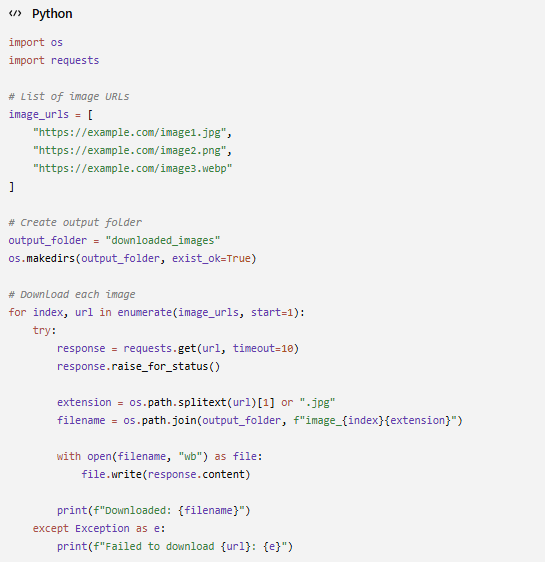
This script downloads images from a predefined URL list and saves them locally.
Pros:
- Highly customizable
- Supports automation
- Suitable for large projects
Cons:
- Requires programming knowledge
- Error handling may be necessary
- Not beginner-friendly
Scripts are commonly used for web scraping, research projects, machine learning datasets, and large-scale image collection. However, they are often overkill for everyday users who simply want a quick and easy way to download images.
3. Download Images From URLs With Online URL Downloaders
Online image downloaders provide a simple alternative to scripts and software installations.
These web-based tools allow users to paste an image URL and download the image directly through a browser.
Steps:
- Open an online image downloader like bulkimagedownloader.in.
- Paste the image URL into the provided field.
- Click the download button and save the image to your device.
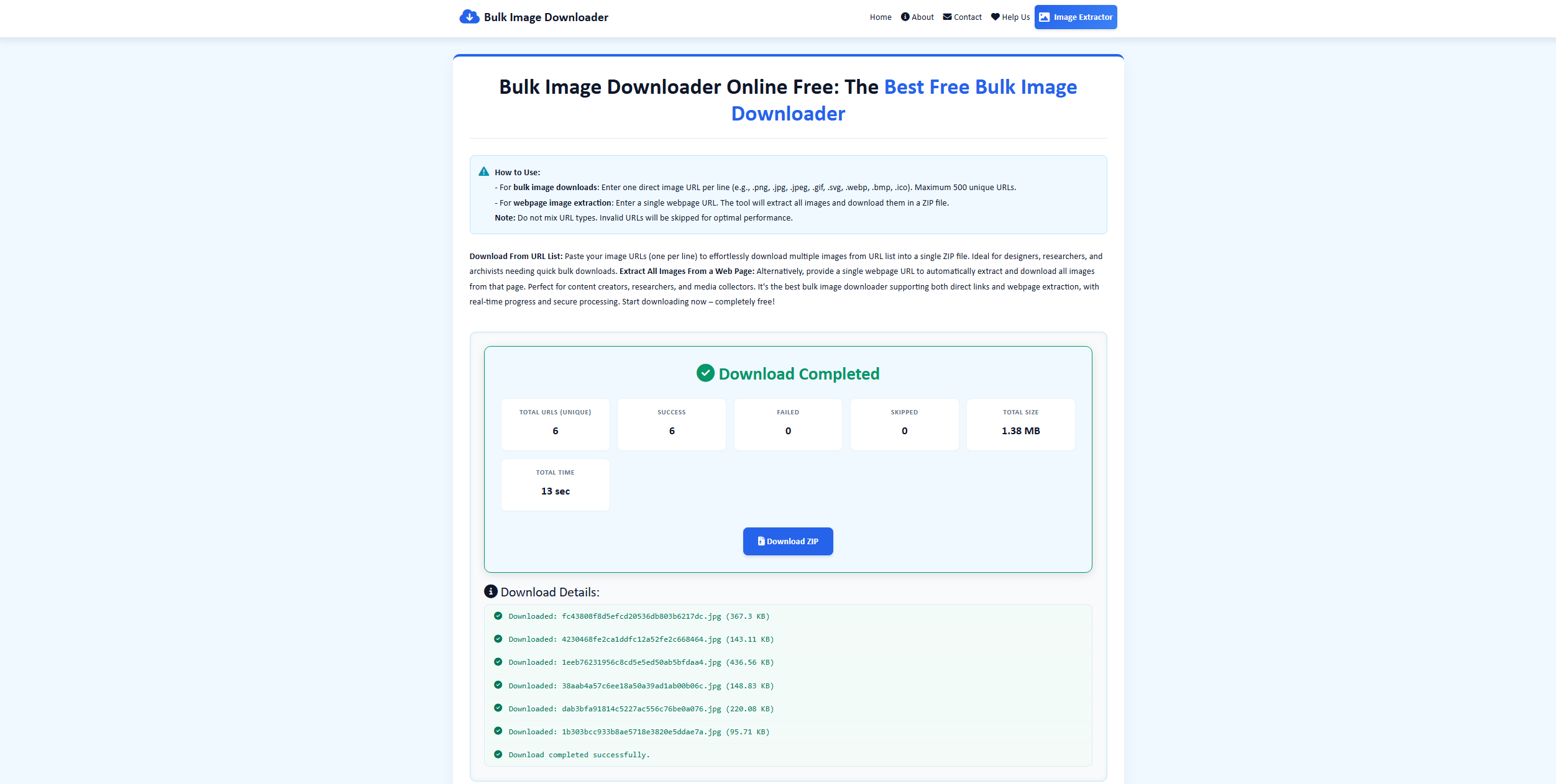
Some services can even detect images from webpage URLs and generate downloadable links automatically.
Pros:
- No installation required.
- Accessible from any device.
- Easy to use.
Cons:
- Many websites display intrusive advertisements.
- Download speeds may be limited.
- Privacy concerns when submitting URLs to third-party services.
Online downloaders are convenient for occasional downloads but are not ideal when working with large numbers of images.
4. Download Images From URLs With Browser Extensions
Browser extensions bridge the gap between manual downloading and dedicated software by adding image downloading capabilities directly to your browser.
Popular image downloading extensions can detect images on a webpage and provide batch download options.
How to get images from URLs using extensions:
- Install an image downloader extension like Bulk Image Downloader From List.
- Copy the image URLs you want to download, then click the extension and paste the URLs.
- Scrape available images from URLs and download them in bulk.

Pros:
- Faster than manual downloading.
- Convenient browser integration.
- Can download multiple images simultaneously.
Cons:
- Often limited to browser sessions.
- May not work on dynamically loaded websites.
- Some extensions struggle with protected content.
- Advanced filtering options are usually limited.
Extensions are useful for casual image collection but may become restrictive when handling large projects or multiple websites.
5. Advanced Bulk Download Images from URLs with PicCat
If you frequently download images from URLs, a dedicated bulk image downloader offers the most efficient solution. PicCat is specifically designed to simplify image collection and management.
PicCat is a powerful bulk image catcher that allows users to catch, preview, filter, organize, rename, and download images from webpages and image URL lists.
Key features of PicCat:
- Bulk Download Images from image URLs and web pages.
- Extract original quality images from pages.
- Filter Images by file format and size.
- Batch Rename Files with simple naming rules.
- Copy & Export Image URLs with one click.
- Support Multiple Formats including JPG, PNG, GIF, WebP, and SVG.
How to bulk download images from URLs using PicCat:
- Download, install and launch PicCat on your computer.
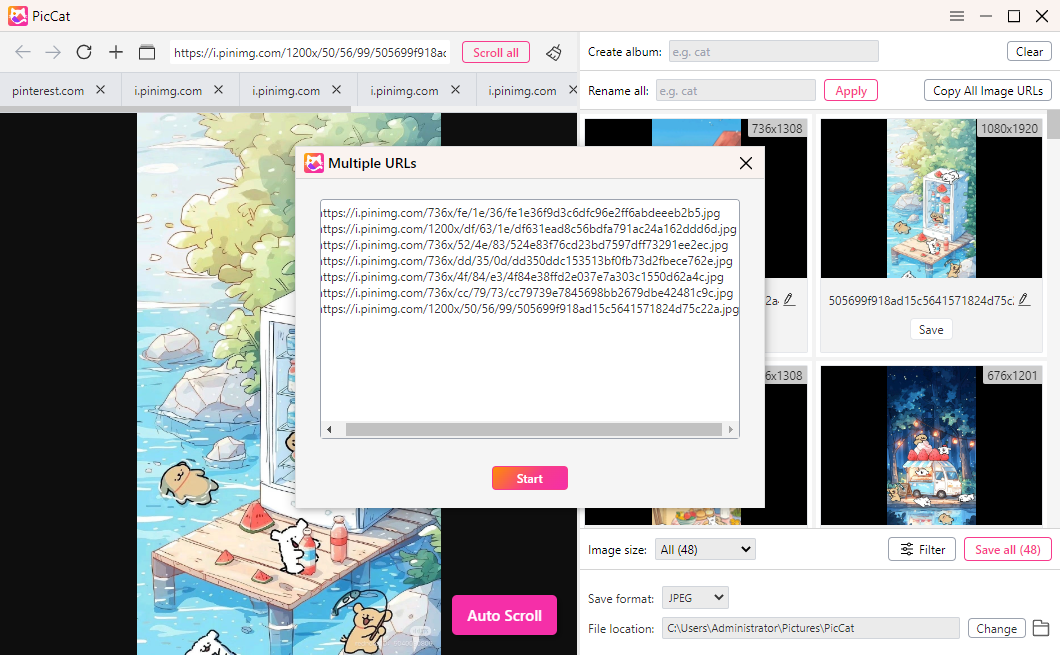
- Paste one or multiple image URLs into PicCat, click Auto Scroll to scan to detect available images.
- Preview and filter images by format, size, or resolution.
- Set the output folder and optional rename rules.
- Click Save all to export all selected images in bulk, then access your downloaded images from the chosen folder.
6. Conclusion
There are many ways to download images from URLs, and the best choice depends on your needs. Manual downloading is suitable for occasional image saving, while scripts provide powerful automation for technical users. Online downloaders and browser extensions offer convenient alternatives for lightweight tasks.
However, when it comes to downloading large numbers of images efficiently, dedicated software delivers the best experience. PicCat combines bulk downloading, image previewing, advanced filtering, batch renaming, and flexible export options into a single streamlined solution.
Whether you’re a designer, marketer, researcher, content creator, or everyday internet user, PicCat makes collecting and managing images significantly faster and easier. If you regularly work with image URLs and need a reliable bulk downloading solution, PicCat is the most efficient option available.